2. Separation of functionality between client and server
The CTGames web app does most of its work on the client side (in the browser), and the server-side part of the web app only deals with authentication, class activation, and managing players’ scores.
The figure “Overview of game menu for multiple games running in the web browser” shows an overview of what work is done on the browser. Code running in the browser manages the sign-in screen, the teacher’s menu, the game menu (list of all games), and downloads the code for the game selected by the player as needed. It also runs the code to play the game.

Fig. 2.3 Overview of game menu for multiple games running in the web browser
The games are written using Python. Each Python game should run in the player’s web browser, so the Python code needs to be converted into JavaScript, or some other language widely understood by web browsers. To achieve this we use Brython, which is a transpiler from Python to JavaScript. Brython, written in JavaScript itself, runs in the browser and converts the Python code into JavaScript on-the-fly, as soon as the web browser downloads the Python code for each game. Brython also includes the functionality to interact with the DOM, so the Python games usually include special Brython-only commands that allow it to manipulate a web page’s SVG images.
For an individual game, the interaction between the Python code for that game and CTGames, Brython, and JavaScript (HTML5), is illustrated in figure “Interaction between Python code and other technologies for a single game”.
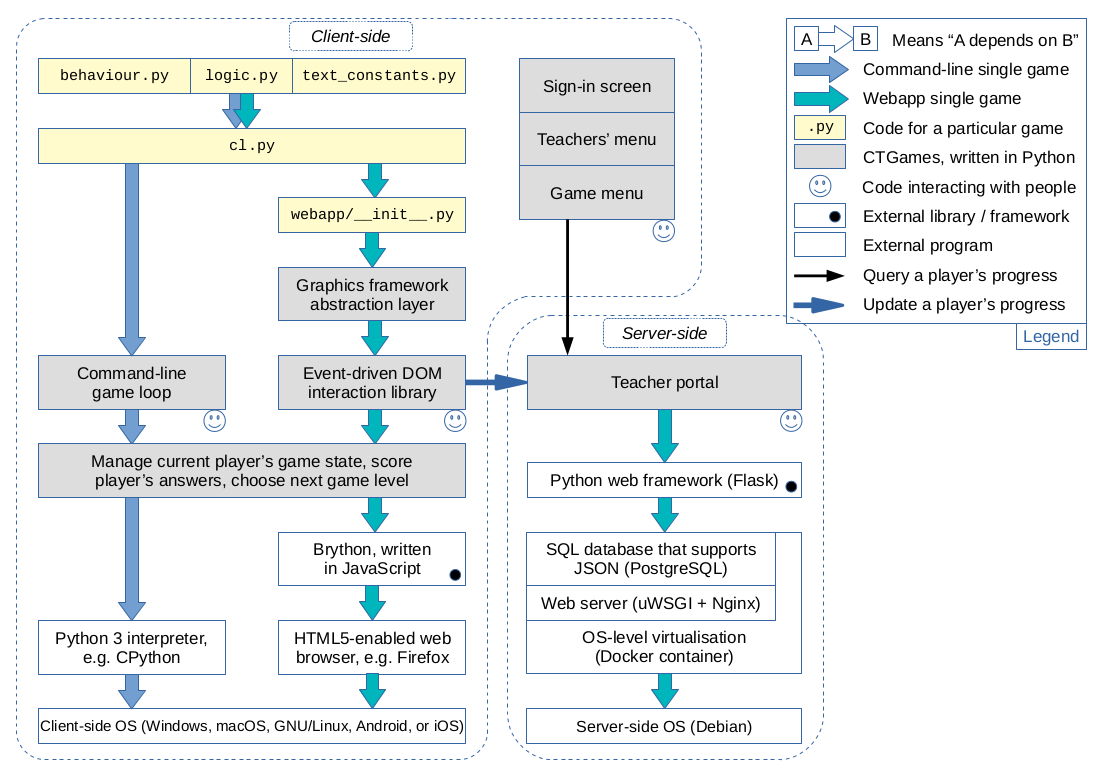
Fig. 2.4 Interaction between Python code and other technologies for a single game
To create a new game for CTGames, the programmer is required to create a new skeleton game using a provided game template and then edit the files highlighted in yellow in the figure. These are behaviour.py, logic.py, text_constants.py, and cl.py for the command-line version of the game. Additionally, a light-touch graphical front-end can be put on the command-line game by manipulating the DOM through edits to the files webapp/__init__.py and webapp/names.py.