6. The namedtuple TextImageSeq
(defined in ctgamestypes.py)
This section explains the namedtuple TextImageSeq, which is the type returned from functions format_problem_instance(), format_correct_answer(), format_question(), format_rules_text(), and format_correct_answer(), and is the data type of the name TUTORIAL_TEXT_IM_SEQ.
The namedtuple is used to store separate lists of text strings, images, and DOMNodes to be displayed interlaced (as a sequence, or as a table) in the DOM.
For example, suppose that you want the following sequence to appear in the DOM: text “Hello”, image “path/a.svg”, image “path/b.svg”, and finally text “there!”. Then, you should use the parameters text_seq and im_seq as follows:
return TextImageSeq(
    text_seq=['Hello', None, 'there!'],
    im_seq=['path/a.svg', 'path/b.svg', None],
    )
The respective values in text_seq are placed to the left of their counterparts in im_seq, unless you pass an appropriate code to interlacing. Parameter dom_element_seq is not mentioned in this example, but it would be used in cases where you have a name referring to a DOMNode object to display (e.g. a SVG object created as described in section “The function create_svg_instance()”).
As another example, the parameters text_table (for text strings), im_table (for image filenames), and dom_elem_table (for DOMNode objects such as SVG instances) are used together to specify a single HTML table. These three parameters each specifies a table as a sequence of rows (where each table row is itself specified as a sequence). The values in each of these three sequences of sequences are interlaced to determine the contents of the cells in the table. So, a table specified with
return TextImageSeq(
    text_table=[['hi', None, 'hi']],
    im_table=[[None, 'path/ball.svg', 'path/ball.svg']],
    )
would be a one-row table with ‘hi’ in the first cell, a ball image in the second cell, and both ‘hi’ and a ball image in the third cell.
The game developer builds up sequences of text, image filenames, and DOMNodes, formats them as an instance of TextImageSeq, returns it from a function such as format_problem_instance(), and the CTGames framework displays it in the appropriate position in the web app (as the problem instance in the case of function format_problem_instance(), as the correct answer if the player gets the wrong answer in the case of function format_correct_answer(), and so on).
6.1. Fields in the namedtuple
The default value of each field is None. Only those fields that you want to use need be assigned values in your code.
text_seqA sequence or
None: a sequence of text strings to be displayed in the DOM, interlaced with the sequencesim_seqanddom_element_seq.im_seqA sequence or
None: a sequence of images (each in the form of an image path accessible by HTTP) to be displayed in the DOM, interlaced with the sequencestext_seqanddom_element_seq.dom_element_seqA sequence or
None: a sequence of DOMNode objects to be added to the DOM tree, interlaced with the text and image filename sequences. For an explanation for whendom_element_seqshould be used, see section “Which to use, im_seq or dom_element_seq?”.text_tableA sequence or
None: a sequence of sequences of text strings to be displayed in the DOM as a table, each cell being combined with the appropriate element ofim_tableanddom_elem_table.im_tableA sequence or
None: a sequence of sequences of images (each in the form of an image path accessible by HTTP) to be displayed in the DOM as a table, each cell being combined with the appropriate element oftext_tableanddom_elem_table.dom_elem_tableA sequence or
None: a sequence of sequences of DOMNode objects to be displayed in the DOM as a table, each cell combined with the appropriate element oftext_tableandim_table.im_heightAn
int, a sequence ofint, orNone: the requested height of the images in the DOM. If a sequence is passed, a different height for each image in the sequence/table can be specified. If the sequence is too short, the last element is repeated as necessary.im_widthAn
int, a sequence ofint, orNone: the requested width of the images in the DOM. If a sequence is passed, a different width for each image in the sequence/table can be specified. If the sequence is too short, the last element is repeated as necessary.cell_borderAn
intorNone: the thickness of the line border (in px units) around each cell of the table (ignored if its truthiness isFalse).cell_paddingAn
intorNone: the amount of padding (in px units) to apply to each cell in a table.captionA
strorNone: the caption for the table (ignored if evaluates toFalse).table_styleA
dictorNone: CSS properties to modify the style of the table.cell_styleA
dictorNone: CSS properties to modify the style of each cell of the table.seq_firstA
boolorNone: Whether the sequence should appear before the table or not.interlacingA
strorNone: Astrdenoting the order that the elements will be interlaced. For example, ‘TID’ (the default value) denotes that in each element of an interlaced seq/table, the text (‘T’) will appear first, then the image (‘I’), and then the DOMNode element (‘D’).allow_multi_column_tableA
boolorNone: Whether the framework is allowed to automatically wrap a table into multiple columns (e.g. half its height and double its width) if it gets too tall.Note
Some attributes of images can be specified through the fields of
TextImageSeq(such as height and width) but not all. If there are other image attributes that you wish to specify (such asidoropacity) you should usedom_element_seqfor the images, which allows you to specify any DOM attribute of the images on an individual basis.
6.2. Which to use, im_seq or dom_element_seq?
Both parameters im_seq and dom_element_seq can be used to display images.
There are technical differences between the two approaches.
With im_seq, we put the elements into the DOM as separate images and the web browser takes care of putting them side-by-side and figuring out if they overflow onto the next line, etc.
We specify values for im_height and im_width for each image and the web browser figures their horizontal and vertical position coordinates.
We decide not to have control over issues such as horizontal spacing, vertical adjustments, and overlapping of images.
This makes our code shorter and simpler.
With dom_element_seq, we must specify for each image separate horizontal and vertical position coordinates, as well as height and width.
We must go to the effort of supplying the coordinates, but this allows us the ability to position the images arbitrarily (one image partially or fully overlapping another, for example).
A list of example use-cases is
I just want to get images on the screen in a specified order and I’m happy to let the browser make all sensible decisions about the layout – use
im_seq,I wish the browser to automatically wrap my images onto the next line when the width of the browser window is reached – use
im_seq,I wish to animate the images (change one of its attributes) now or in the future – use
dom_element_seq,I wish to know the
idof an image, or give a specificidto an image, or have a direct reference to an image in the DOM so that I can later query or change its attributes – usedom_element_seq, andI wish to have multiple images in one of the elements in the sequence – use
dom_element_seq.
The comparison above also holds for im_table and dom_elem_table.
If one is interested in such a technical detail: in the DOM, images displayed using im_seq (and im_table) become <img> DOMNode objects while images displayed using dom_element_seq (and dom_elem_table) become <image> SVG elements inside a parent <svg> object.
6.3. Examples
In file justaddition/webapp/__init__.py, the function format_problem_instance() returns a sequence of images preceded by some text:
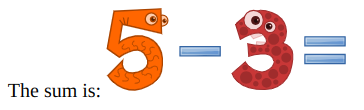
Fig. 6.1 Example of a TextImageSeq object that uses parameters text_seq and im_seq
# Replace each symbol with an appropriate image filename
fnames = [IM_PATH.format(symbol) for symbol in symbols]

text_im_seq = TextImageSeq(
    text_seq=[text + ': '],
    im_seq=fnames,
    im_height=IM_HEIGHT,
    im_width=IM_WIDTH,
    )
return text_im_seq
In file crosscountry/webapp/__init__.py, the function format_rules_text() returns a table containing a mixture of text and images as shown in the image below (some of the code has been simplified to illustrate the main concepts). Also, this example shows the use of parameter table_style to modify CSS properties to style the table (ensuring the images vertically align with one another):
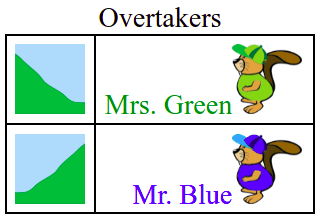
Fig. 6.2 Example of a TextImageSeq object that uses parameters text_table and im_table
items = [['uphill', 'Mrs. Green'], ['downhill', 'Mr. Blue']]

text_table = []
im_table = []
for (terrain, name) in items:
    text_table.append([None, name])
    im_table.append([IM_PATH.format(terrain), IM_PATH.format(name)])

text_image_seq = TextImageSeq(
    text_table=text_table,
    im_table=im_table,
    im_height=40,
    cell_border=1,
    cell_padding=5,
    caption='Overtakers',
    table_style={'text-align': 'right'},
    )
return text_image_seq
In file dungeonescape/webapp/__init__.py, the function format_problem_instance() returns a TextImageSeq object that contains a single DOMNode object (note, it still needs to be formatted as a list even there is only one object):
global_svg_instance = create_svg_instance(
    # Parameters hidden for this example
    )
return TextImageSeq(dom_element_seq=[global_svg_instance])
In file balloons/webapp/__init__.py, the function format_rules_text() returns a table containing a mixture of text and images as shown in the image below. In contrast to Fig. 6.2, in this table we wish to have multiple images in some cells, so we need to combine the multiple images into a single DOMNode object and use a dom_elem_table rather than the im_table used in Fig. 6.2.
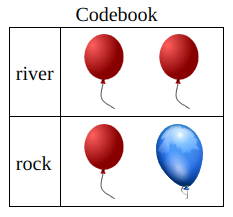
Fig. 6.3 Example of a TextImageSeq object that uses parameters text_table and dom_elem_table
The pseudocode for the the table above is
IM_SIDE = 60
"""The required side length for each image."""

# The first row
svg1 = create_svg_instance(...)
graphic_a = create_image_from_file(x=0, IM_PATH.format('red'))
svg1 <= graphic_a
graphic_b = create_image_from_file(x=IM_SIDE, IM_PATH.format('red'))
svg1 <= graphic_b

# The second row
svg2 = create_svg_instance(...)
graphic_c = create_image_from_file(x=0, IM_PATH.format('red'))
svg2 <= graphic_c
graphic_d = create_image_from_file(x=IM_SIDE, IM_PATH.format('blue'))
svg2 <= graphic_d

# The text will be in the first column of the table only
text_table = [['river', None], ['rock', None]]

# A sequence of images will be in each row of the second column
dom_elem_table = [[None, svg1], [None, svg2]]

text_image_seq = TextImageSeq(
    text_table=text_table,
    dom_elem_table=dom_elem_table,
    )
return text_image_seq
The actual code (in a slightly simplified form) is
IM_SIDE = 60
"""The required side length for each image."""

def _code_svg(code: str) -> DOMNode:
    """Return a SVG encoding of the str `code`."""
    # Create a SVG container for the balloons
    svg = create_svg_instance(
        id=f'svg_{code}', height=IM_SIDE, width=len(code)
        )
    # Add the balloon SVG images one at a time to the SVG container
    for count, symbol in enumerate(code):

        colour = 'blue' if symbol == '0' else 'red'
        graphic = create_image_from_file(
            id=f'svg_{code}_{count}',
            x=IM_SIDE * count,  # Separate them horizontally
            y=0,
            width=IM_SIDE,
            height=IM_SIDE,
            href=IM_PATH.format(colour),  # the files are 'blue.svg' and 'red.svg'
            )
        svg <= graphic
    return svg

codebook = {'river': '00', 'rock': '01'}

# The text will be in the first column of the table only
text_table = [[word, None] for word in codebook.keys()]

# Specify a table with a seq of SVG images in each row of the second column
dom_elem_table = [[None, _code_svg(code)] for code in codebook.values()]

text_image_seq = TextImageSeq(
    text_table=text_table,
    dom_elem_table=dom_elem_table,
    cell_border=1,
    cell_padding=5,
    caption='Codebook',
    table_style={'text-align': 'left'},
    allow_multi_column_table=True,
    )
return text_image_seq