3. Basic usage of GSAP in web apps
This subsection gives brief explanations of some of the basic GSAP functions with examples of their use in CTGames web apps.
See also
For more details of each function in this section, please consult the official GSAP docs listed in section “External resources for learning about GSAP”.
The subsections in this section are
3.1. Importing GSAP
The first step is to import GSAP into one’s webapp/__init__.py file:
from ctgames.svgcommon import gsap
This creates a reference to the GreenSock GSAP JavaScript library.
Note
The following information is not important in order to develop CTGames games, but under the hood what we have is the following in the HTML of the CTGames web page
<script src="https://cdnjs.cloudflare.com/ajax/libs/gsap/X.Y.Z/gsap.min.js">
</script>
<script src="https://cdnjs.cloudflare.com/ajax/libs/gsap/X.Y.Z/MotionPathPlugin.min.js">
</script>
and the following in CTGames framework file
svgcommon.py# Create a convenient reference to GreenSock GSAP JavaScript library gsap = window.gsap # Register GSAP plugins (loaded using <script> tags in file views.py) gsap.registerPlugin(window.MotionPathPlugin)This minor indirection (hiding the reference to
window) means that these docs do not need to cover how JavaScript libraries are imported, or how Brython works, in order to explain how to use GSAP to a Python programmer.
3.2. Passing parameters to GSAP functions
Most parameters passed to GSAP functions in CTGames web apps are passed directly to JavaScript by Brython. This is true for ints, floats, strings, and references to DOMNode objects. In the context of GSAP, Python lists can also be used interchangeably with JavaScript arrays. Brython provides the glue that allows JavaScript functions to be called directly from CTGames (essentially, Python) web apps. This means that with respect to these types, the JavaScript docs for GSAP functions can be used directly by a CTGames programmer.
One case where JavaScript examples in the GSAP docs will require some slight modification for CTGames web apps is when passing a dict to GSAP functions. Here, the GSAP keys are not defined in the Python namespace and so must be passed as strings.
Tip
The GSAP docs use the term “object” to refer to what Python programmers know as a dict.
For example, the following JavaScript code from the GSAP docs
gsap.to("#box", {rotation: 27, x: 100, duration: 1});
would need to be written in a CTGames web app as (note the keys are changed to strings)
gsap.to('#box', {'rotation': 27, 'x': 100, 'duration': 1})
Note, in the above example, the use of single quotes rather than double quotes for strings is a CTGames Python coding style choice.
3.3. The function gsap.to()
The function gsap.to() has full instructions in the gsap.to() GSAP docs, but here’s a brief introduction. The function is used to animate DOMNode attributes (including those of a SVG or SVGImageElement object) from their current value to a specified value. The function takes the two parameters
targetsA
str, a DOMNode object, or a list of DOMNode objects: The DOMNode objects to be animated. If astr, it is assumed to be a selector such as'#id'.varsA
dict: The keys invarsare the DOMNode attributes to be animated. The values invarsare the values the respective attributes should have at the end of the animation. Additional GSAP-specific keys such asdurationandease(explained below) are allowed.
3.3.1. Most useful keys of vars
The most useful keys of the dict parameter vars of gsap.to() (see the gsap.to() docs for full explanations) are
xA number or a
str: the horizontal position of the top-left corner of the DOMNode object within the parent’s frame of reference (where positive means right). If astr, then it can simply be the string encoding of a number (such as'5') which is an absolute coordinate, or it can be a relative value such as'-=5'which means 5 pixels (to the left) relative to the current position of the DOMNode object.yA number or a
str: the vertical position of the top-left corner of the DOMNode object within the parent’s frame of reference (where positive means down). If astr, then it can simply be the string encoding of a number (such as'5') which is an absolute coordinate, or it can be a relative value such as'-=5'which means 5 pixels (to the upwards) relative to the current position of the DOMNode object.rotationA number or
str: The angle to rotate the object in degrees or radians, e.g.'-30deg'(equivalent to the integer-30) or'1.5rad'. The rotation is clockwise when the rotation angle is positive and counter-clockwise when the rotation angle is negative. A relative value can also be used, e.g.'+=10deg'. See the GSAP CSSPlugin 2D Transforms docs for more details. The direction of rotation can also be chosen between clockwise, counter-clockwise, and shortest direction (see GSAP CSSPlugin directionalRotation docs).transformOriginA
str, default'50% 50%': The centre about which to rotate, scale, or otherwise transform the object (used in conjunction withrotation,scaleX, and so on). By default it is the centre of the object, but you can specify
pixels: e.g.
'100px 200px'which would be a point 100 pixels to the right, and 200 pixels down, from the top left cornerpercentages: e.g.
'0% 0%'for the top left corner,'50% 50%'for the centre, and'100% 100%'for the bottom right corner (again, the first value refers to horizontal direction and the second value refers to he vertical direction)keywords: e.g.
'top'(equivalent to'50% 0%'),'left'('0% 50%'),'right'('100% 50%'),'bottom'('50% 100%'),'right top'('100% 0%'), and so on.See the GSAP CSSPlugin transformOrigin docs for more details.
durationA number or a
str: The length of time (in seconds) that the animation should run for before the attributes reach their specified values. If it is astrthen it is a simple string representation of a number. Examples include0.5,'0.5', and'2'.autoAlphaA number or a
str: A GSAP-specific alternative to the CSS opacity property which has valid values from 0.0 (fully transparent) to 1.0 (fully opaque). UsingautoAlphaensures that clicks/interactivity are disabled when the object is fully transparent. See the GSAP CSSPlugin autoAlpha docs for more details.easeA
str, default'power1.out': The easing function. different uses of two easing functions ('elastic.out'and'bounce.out') are demonstrated in the CTGames game Just Reverse (filejustreverse/webapp/__init__.py). An explanation for each function can be found in the GSAP eases docs.staggerA number or
dict: Iftargetsis a list of DOMNode objects, the start time for the animation of each each object can be staggered by setting a value like'stagger': 0.1(for 0.1 seconds between each start time). Adictcan be used to specify the order that the objects start their animations, and eases applied to each object’s animation. For example,'stagger': 0.1is equivalent to'stagger': {'each': 0.1, 'from': 'start'}. The keyfrom(default value 0) can have any value from {'start','end','center','edges','random'} ∪ N ∪ (R × R). See the stagger documentation for the full explanation.delayA number: The amount of delay before the animation should begin (in seconds).
svgOriginA
str: An alternative totransformOriginthat is only relevant for SVG objects. Allows one to specify a centre of rotation in the parent’s coordinate system rather than the rotated element’s coordinate system. Pixel values only are accepted, e.g.'100 200', and not percentages or keywords. See the GSAP CSSPlugin svgOrigin docs for details.runBackwardsandimmediateRenderA
bool, defaultFalse: The itemrunBackwards: Truecauses the animation to invert its starting and ending values. The itemimmediateRender: Trueforces the browser to render the object immediately upon instantiation, rather than waiting until the animation starts (for more details see this GSAP immediateRender article). The most interesting use of these two keys is that you can turn agsap.to()into a gsap.from() by setting bothrunBackwardsandimmediateRenderequal toTrue. An example is given below in section “Combined translation and rotation”.
3.3.2. Using the function gsap.to() for translation
In file justreverse/webapp/__init__.py, the function format_problem_instance() animates the x attribute of all elements of a list of DOMNode objects with
gsap.to(
    blocks,
    {
        'x': f'-={parent_width}',
        'duration': 1.5,
        'ease': 'elastic.out',
        'stagger': 0.1,
        },
    )
The elements are animated to a position parent_width pixels to the left of their current position. The item 'stagger': 0.1 starts (and finishes) the animation for each block 0.1 seconds after the block to its left.
3.3.3. Using the function gsap.to() for rotation
In file necklace/webapp/__init__.py, the function format_problem_instance() animates a SVG object (an object returned from create_svg_instance()) by rotating it by two full rotations, over a period of 2 seconds, incorporating an exponential (rapid) slow-down in rotation speed as the animation comes to an end, with
sign = choice(('', '-'))
gsap.to(
    svg_instance,
    {'rotation': f'{sign}720deg', 'duration': 2, 'ease': 'expo.out'},
    )
Here, the code randomly chooses between clockwise and counter-clockwise rotation.
3.4. The function gsap.set()
The function gsap.set() (see gsap.set() GSAP docs) instantly applies values to attributes – it acts like a call to gsap.to() with a duration of 0 seconds. It takes the same two parameters as gsap.to().
In file dungeonescape/webapp/__init__.py, the function update_problem_instance() sets a DOMNode object key to be rotated by a specified angle and to be invisible, with
gsap.set(
    key,
    {
        'autoAlpha': 0,
        'rotation': f'{angle}deg',
        'transformOrigin': '20% 50%',
        },
    )
The item 'transformOrigin': '20% 50%' sets the centre of rotation of key to be left-of-centre in the object and 'autoAlpha': 0 makes the object invisible and unselectable/unclickable.
In file justreverse/webapp/__init__.py, the function format_problem_instance() sets all elements in a list of DOMNode objects to have an x value that puts it a large distance to the right, with
blocks = [
    create_image_from_file(
        # Code hidden for this example
        )
    for index, letter in enumerate(word)
    ]

# Position each block out of view initially
gsap.set(blocks, {'x': f'+={parent_width}'})
Setting x to f'+={parent_width}' (e.g. '+=500' in the case that parent_width is 500) has the meaning in GSAP that each object’s x attribute should be incremented by parent_width. This can be a very efficient way of setting multiple objects’ attributes to different but related values.
In file justreverse/webapp/__init__.py, the function format_problem_instance() sets both the x and rotation of each element of a list of objects with
# Position each block out of view and slightly rotated initially
gsap.set(
    blocks,
    {
        'y': f'-={IM_BLOCK_SIDE * 1.5}',
        'rotation': '-=90deg',
        },
    )
The blocks are animated as they return to their original positions, using the inverse of the translation and rotation values, 'y': f'+={IM_BLOCK_SIDE * 1.5}' and 'rotation': '+=90', respectively.
3.5. Unused GSAP functions
There are other GSAP functions. The following ones are the main ones, but none are recommended for CTGames, as explained below.
3.5.1. The function gsap.from()
The function gsap.from() (see gsap.from() GSAP docs) allows one to specify the starting values and the animation runs from those to the current values.
The function gsap.from() hasn’t been used in any CTGames web apps yet.
Note
Since the keyword
fromis reserved in Python, we cannot actually have a function with this name in our Python code. As of 2021, there is no solution for how Brython code can call JavaScript functions whose names are reserved Python keywords. If agsap.from()is needed, you can effect agsap.from()function by constructing agsap.to()call that includes the items'runBackwards': Trueand'immediateRender': Trueinvars. An example is given below in section “Combined translation and rotation”.
3.5.2. The function gsap.fromTo()
The function gsap.fromTo() (see gsap.fromTo() GSAP docs allows one to specify both the starting and ending values for an animation.
The function gsap.fromTo() hasn’t been used in any CTGames web apps yet. The clarity of separate gsap.set() and gsap.to() calls compensates for the slight increase in verbosity.
3.5.3. The function gsap.defaults()
The function gsap.defaults() (see gsap.defaults() GSAP docs) allows one to specify values for DOMNode attributes and GSAP behaviours that will be adopted by all animations.
Warning
Don’t use
gsap.defaults()in your games. Because all web app games in CTGames run as part as a single-page web app they will all share a common GSAP library instance. Therefore, calls togsap.defaults()will affect all games that are played after your game until the next time CTGames is reloaded (Ctrl-r in the browser).Tip
GSAP Timelines can define their own local defaults and this should be sufficient for all CTGames web apps.
3.6. More complicated gsap.to() examples
The following examples highlight some of the things that GSAP has been used for in CTGames web apps.
3.6.1. Combined translation and rotation
In file justreverse/webapp/__init__.py, the function format_problem_instance() animates the x and rotation attributes of the elements in a list of DOMNode objects (shown in the image below) with
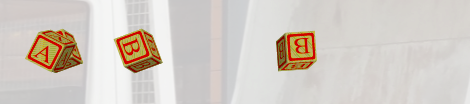
Fig. 3.1 Example of a frame in an animation of rotating objects translating from right to left with a stagger
# Position each block out of view initially
gsap.set(blocks, {'x': f'+={parent_width}'})
# Move it back to its original position as an animation
gsap.to(
    blocks,
    {
        'x': f'-={parent_width}',
        'rotation': '-=360deg',
        'duration': 1.5,
        'ease': 'bounce.out',
        'stagger': 0.1,
        },
    )
In this example, blocks have already been created in their final positions and gsap.set() is used to position each one off-screen to the right.
Counter-clockwise rotation is specified (note the negative sign).
The stagger value is a simple 0.1 second delay between the start of the animation of each block.
Note
The calls to gsap.set() and gsap.to() above can be combined into a single call (emulating a gsap.from() call) as follows
gsap.to(
    blocks,
    {
        'runBackwards': True,
        'immediateRender': True,
        'x': f'+={parent_width}',
        'rotation': '-=360deg',
        'duration': 1.5,
        'ease': 'bounce.out',
        'stagger': 0.1,
        },
    )
However, most CTGames web apps do not employ this idiom when an object is to be animated from some position back to its original position, and use instead the more verbose equivalent of separate gsap.set() and gsap.to() calls.
In file justreverse/webapp/__init__.py, the function format_problem_instance() animates the y and rotation attributes of all elements in a list of DOMNode objects (shown in the image below) with

Fig. 3.2 Example of a frame in an animation of objects rotating and translating, and with a stagger from the centre
# Position each block out of view and slightly rotated initially
gsap.set(
    blocks,
    {
        'y': f'-={IM_BLOCK_SIDE * 1.5}',
        'rotation': '-=90deg',
        },
    )
# Move it back to its original position as an animation
gsap.to(
    blocks,
    {
        'y': f'+={IM_BLOCK_SIDE * 1.5}',
        'rotation': '+=90',
        'duration': 1,
        'ease': 'bounce.out',
        'stagger': {'each': 0.1, 'from': 'center'},
        },
    )
In this example, the objects have already been created in their final positions and gsap.set() is used to raise and rotate them off-screen.
The gsap.to() animates them lowering and bouncing ('ease': 'bounce.out') into position.
The stagger dict in this cases specifies that the animations for the DOMNode objects should start from the centre objects out towards both edges, with a 0.1 second delay between animations.
3.6.2. Animating along a path
The GSAP MotionPathPlugin allows one to animate any object along a path (or through arbitrary property values). There are several links to reference docs, demos, and examples for this plugin in section “External resources for learning about GSAP”.
In file justreverse/webapp/__init__.py, the function format_problem_instance() animates a list of DOMNode objects along a very simple path (shown in the image below) with

Fig. 3.3 Example of a frame in an animation of objects following a specified path
# Position each block out of view initially
gsap.set(blocks, {'x': f'+={parent_width}'})
# Move it back to its original position as an animation
gsap.to(
    blocks,
    {
        'motionPath': {
            'path': [
                {'x': f'{parent_width*3//4}', 'y': -25},
                {'x': f'{parent_width//2}', 'y': -15},
                {'x': f'{parent_width//4}', 'y': -25},
                {'x': 10, 'y': 0},
                {'x': 0, 'y': 0},
                ],
            },
        'duration': 3,
        'stagger': 0.1,
        },
    )
In this example, the objects have already been created in their final positions and gsap.set() is used to position them off-screen.
The gsap.to() animates them along a smooth curve that goes through four points before arriving at their final positions.
The horizontal positions are approximately equally separated.
The vertical positions differ causing the objects to rise and fall slightly.